PricingOur Principles

Floware LLC • 3800 California Ave SW • Seattle WA 98116
Email info@floware.com

FLO CALENDAr

Not just a calendar. An entire workspace.

Every event connects to everything.

“The future depends on what you do today.” - Mahatma Gandhi.

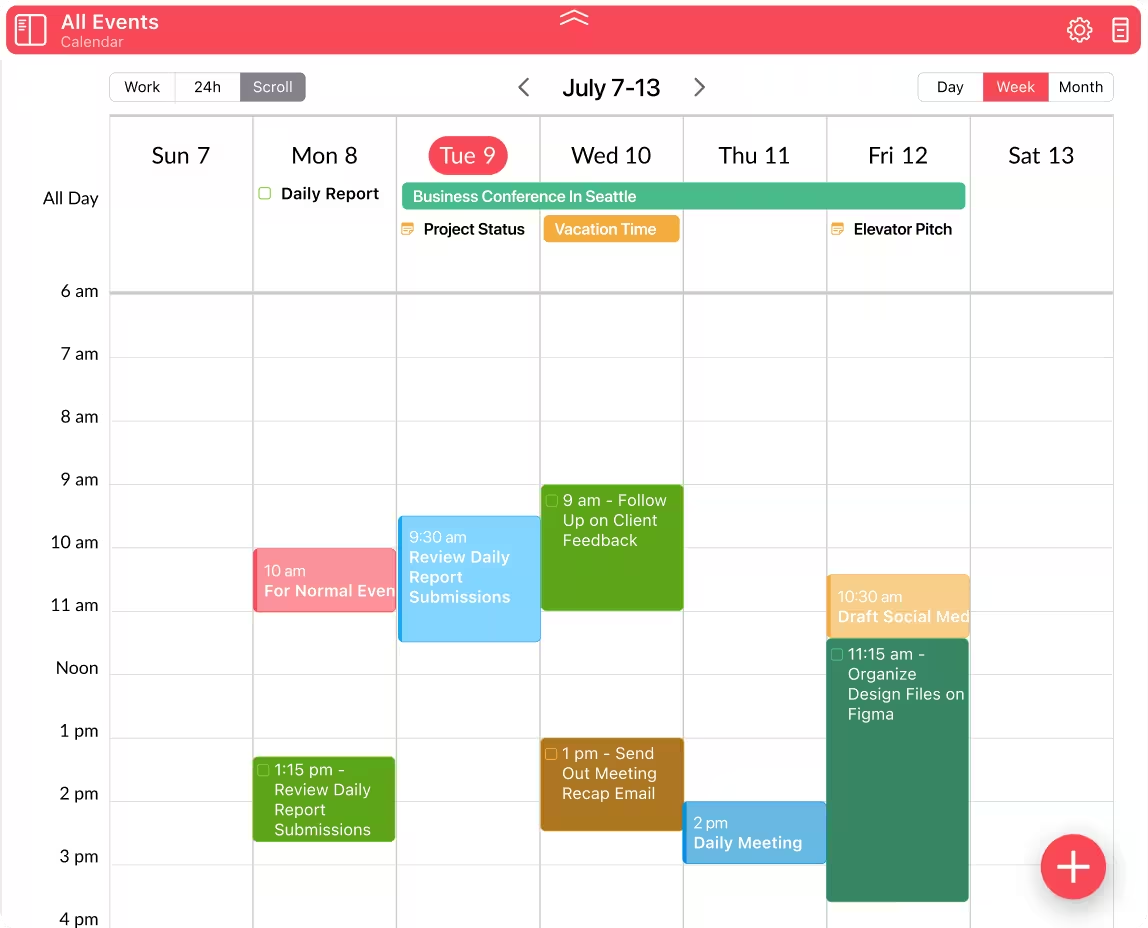
In Flo Calendar, an Event isn't an island. From any Event, generate a linked Note, ToDo or follow-up Event so nothing gets lost after. Jump back to the original to see where it all started.

The Calendar itself goes further. Drag a ToDo into the timeline to schedule it and set its duration. Drop it into the All Day pane to mark a deadline. Notes appear on the date they were created. Everything connected, everything traceable.

In other Calendars, Events are all you see. In Flo, the Calendar is the center of your workflow.

Nobody else makes it this easy.

Explore more
Flo Tech SpecsCalendar

Supported Accounts

  • GetFlo
  • Google Calendar
  • iCloud Calendar
  • Yahoo Calendar (CalDAV)
  • Other CalDAV accounts (read-only)

Views

  • GetFlo
  • Google Calendar
  • iCloud Calendar
  • Yahoo Calendar (CalDAV)
  • Other CalDAV accounts (read-only)

Essentials

  • Create, edit, and delete Events
  • All-day and timed Events
  • Location autocomplete
  • Work hours / 24-hour mode toggle
  • Local filter by Collection / account
  • Event notifications and reminders
  • Read-only 3rd-party Calendars
  • Color objects by type

Superpowers

  • Recurring Events with full update/delete management
  • Meeting invites - accept, decline, tentative (with Email response sent)
  • ICS Email attachments auto-prompt to add to Calendar
  • Notes displayed in Calendar
  • ToDo scheduling in Calendar (manual and auto)
  • Create Event from Email with one click
  • Quick add Event directly in Big Calendar
  • Drag and drop Events within Big Calendar

Platform Specific

iPhone

Month Calendar view; quick view for meeting invites in Email; scheduled Calls.

iPad

Sub-filter in Calendar local filter.

Mac

Big Calendar drag-create Events; mini-month panel; keyboard shortcuts; confirm pop-up for repeating Event updates; show/hide working hours overlay.

Web

Calendar with Day and Month views; FloDav API sync.